
All The Mods 11 is one of the biggest modpacks available right now, packing hundreds of tech, magic, and exploration mods into a single pack. Getting an All The Mods 11 server running takes a bit more resources than a vanilla server, and the pack is updated frequently, which makes version matching between client and server something to keep a close eye on.
Before you get started
hosting a modded server on your own PC is free but comes with three trade-offs worth knowing up front.
- It's only online while your PC is on
- A large pack like ATM11 needs 10–12GB of RAM plus a good CPU, and that's before you've joined yourself
- Letting friends join requires opening a router port, which can expose your network if you're not careful.
None of this is a dealbreaker, but it's worth knowing now rather than mid-setup.
ATM11 Server Hosting
If that sounds like more than you want to manage, using a Minecraft hosting provider skips all three. If you haven’t already, purchase a server with WiseHosting to get started, then follow the instructions:
- Head towards your WiseHosting game panel and locate the "Version" tab
- Choose "Modpacks" and select "CurseForge" from the dropdown filter
- Search for ATM11 and click "Install"
- Click "Start" to start your server
- Copy the IP and join the world
Your server is live in under two minutes, stays online 24/7, and never touches your home network.
If you still prefer to start a CurseForge modpack server yourself, then keep reading.
1. Download the ATM11 server files from CurseForge
If you don't have the CurseForge app yet, download it first. It manages modpack installs, handles NeoForge automatically, and makes switching between versions simple without tracking files manually.
Find the right server version
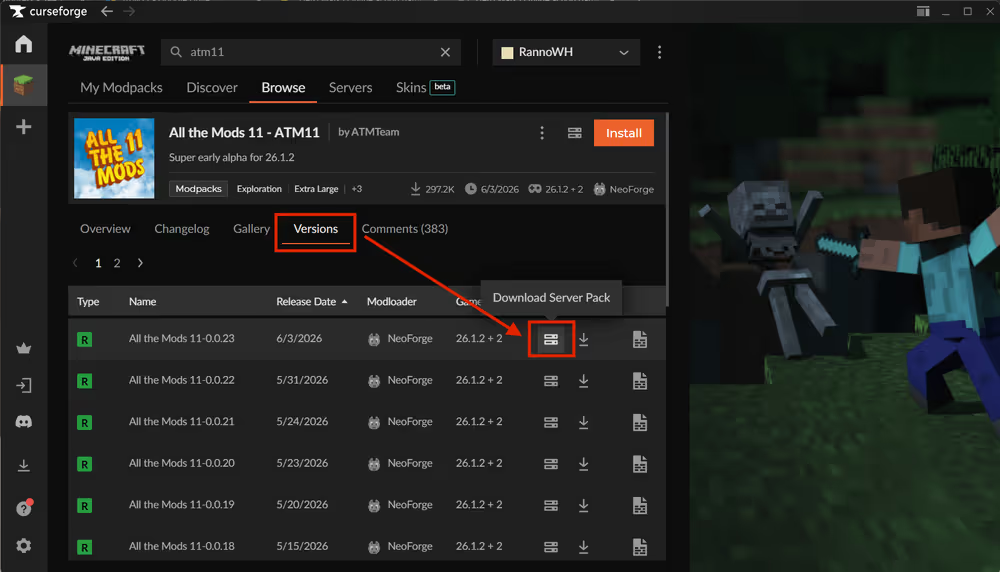
Go to the CurseForge app and search for ATM11 in the Minecraft modpacks section. Head to the All The Mods 11 page on the CurseForge app and click the Download server pack icon next to the Install button. This will download the latest version of the All the Mods 11 server pack.
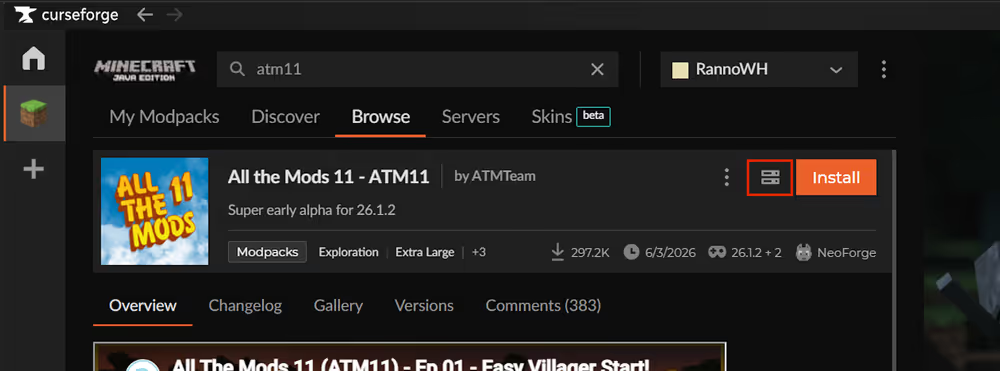
Because ATM11 is actively updated, take note of the exact version number before moving on. Every player connecting to the server needs to be running the same version on their client, and with frequent updates it's easy for someone to auto-update and end up out of sync.
2. Install your ATM11 server
Unzip and run the installer
Extract the downloaded .zip to your desktop or a dedicated folder. Inside you'll find a startserver file along with several other files and folders including server.properties and a mods folder.
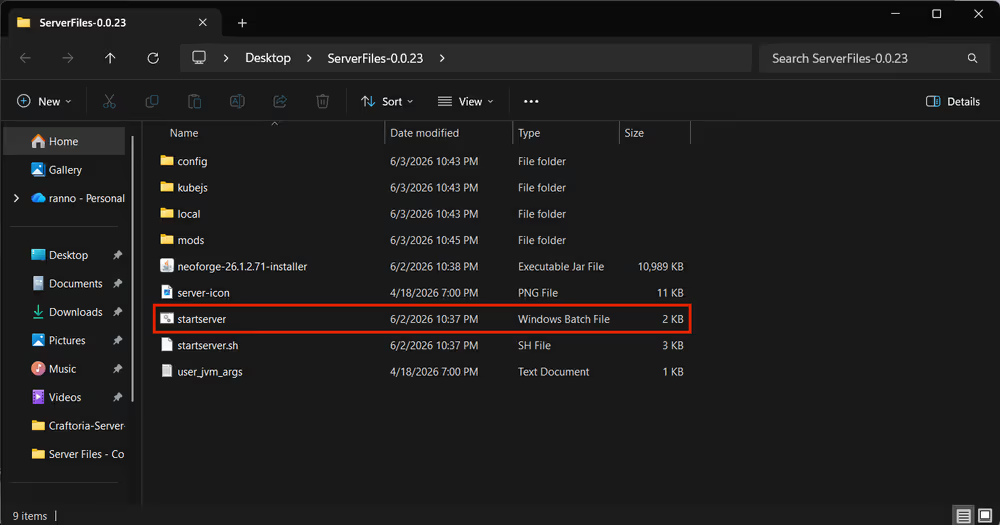
Double-click startserver to begin. A terminal window opens and starts downloading NeoForge and all required libraries. ATM11 has a large mod list so this can take several minutes. Leave it running until it finishes on its own.
Accept the EULA
When the download completes, the terminal stops and asks you to accept Minecraft's End User License Agreement. Press any key to close the terminal.
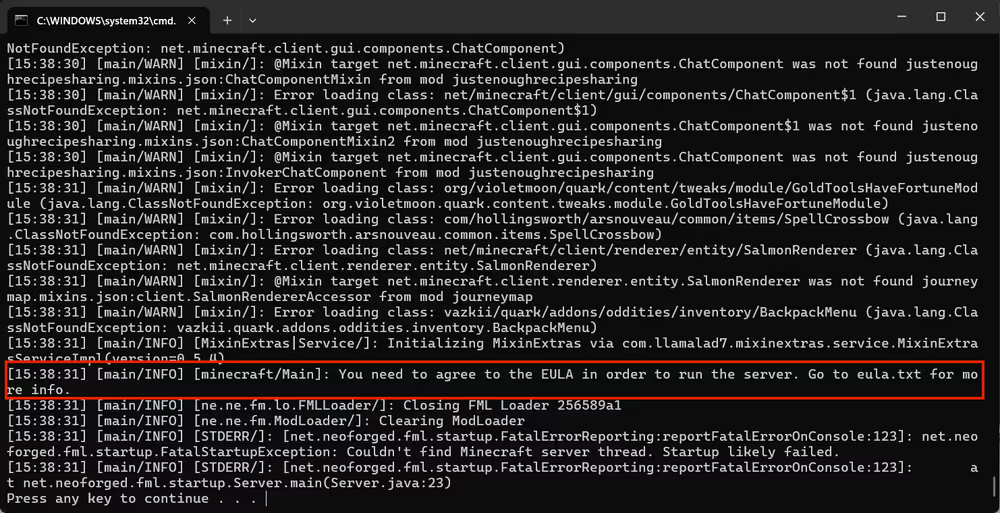
Go back to the server folder and you'll see some files and folders have been added to the folder. Open the eula file in a text editor and change "eula=false" to "eula=true" save the file and the All the Mods 11 server pack is installed.

Start the server by Double-clicking the run or startserver file.
3. Install ATM11 on your client
Use the CurseForge app
Every player joining the server needs ATM11 installed on their own machine through the CurseForge app:
- Open the CurseForge app
- Select Minecraft from the game list
- Search for All The Mods 11 under Browse Modpacks
- Click Install
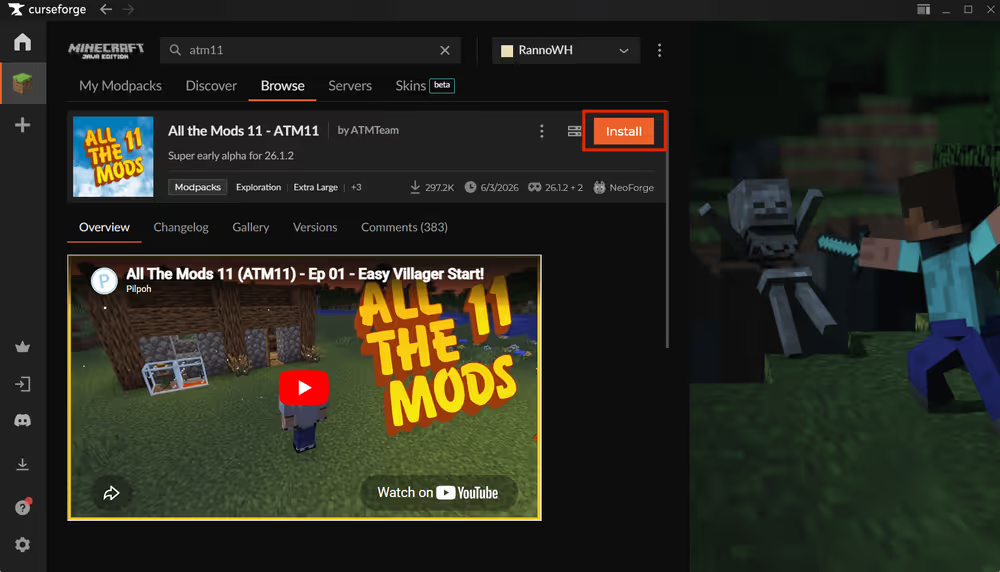
Once installed, launch ATM11 through the CurseForge app and it loads the correct NeoForge version and all mods automatically.
Match client and server versions
Client and server versions need to be identical. This is especially important with ATM11 since the pack updates regularly. A version mismatch produces an error like this on connection:
Connecting to server failed.
Mods that are missing or have version differences:
[list of mismatched mods]
To check the client version, look at the version badge in the top right corner of the ATM11 card on the My Modpacks page in CurseForge. To switch versions, click the three-dot menu on the modpack, select Change Version, and choose the version that matches the server.
4. How much RAM does an ATM11 server need?
ATM11 is one of the heavier packs available. Hundreds of mods running simultaneously means the server has to process a large number of background tasks every game tick, and RAM requirements climb quickly with player count. Ten gigabytes is the practical starting point for a smooth experience.
All The Mods 11 server RAM allocation:
| Players | Minimum RAM | Recommended RAM |
|---|---|---|
| 1-2 | 8GB | 10GB |
| 3-6 | 10GB | 12GB |
| 7+ | 12GB | 16+GB |
Running at the minimum keeps the server online but expect lag during world generation and in areas where multiple players are active at once. The recommended figures give enough room for the server to handle chunk loading, mod processing, and player activity without frequent garbage collection pauses.
Your host machine needs memory on top of what the server uses. Windows typically takes 4–6GB on its own. On a 16GB PC, 10GB is about the max RAM for the server allocation.
Allocate the right amount of RAM
The default RAM in the startup script won't be enough for ATM11. Open the user_jvm_args.txt in a text editor, find the line with -Xmx, and update it to your target. For 12GB:
-Xmx12G -Xms10G
Java version compatibility
ATM11 runs on NeoForge for Minecraft 26.1.2, which requires Java 25. If the terminal closes immediately after you run startserver without downloading anything, a wrong Java version is almost always the cause.
To check what's installed:
- Open Command Prompt (press
Win + R, typecmd, press Enter) - Type
java -versionand press Enter - Look for
openjdk version "25.x.x"in the output
If a different version shows up, download Java 25. With multiple Java versions installed, you may also need to edit the startserver file to point directly to the Java 25 executable path. Or simply uninstall incompatible versions from Control panel
5. Start the server and connect locally
Launch the server
With installation done, double-click startserver. The terminal loads through the mods one by one. ATM11 has a large mod list so the first boot takes longer than most packs.
A successful startup ends with:[Server thread/INFO] [de.sa.ep.Epitaphs/]: Running player backup task
Scroll up a bit, and you can also find:[Server thread/INFO]: Done (Xs)! For help, type "help"
Startup time: Expect 5 or more minutes on the first boot while NeoForge and the mods generate their initial caches. Later starts are noticeably faster.
To stop the server: Type stop in the terminal and press Enter. This saves the world and shuts down cleanly. Closing the terminal window directly risks world corruption or chunk errors on the next launch.
Connect via localhost
Open Minecraft through the CurseForge app, go to Multiplayer, and click Add Server. Set the Server Address to localhost and click Done.
📸 [Screenshot: Minecraft Multiplayer screen with "localhost" entered as the server address]
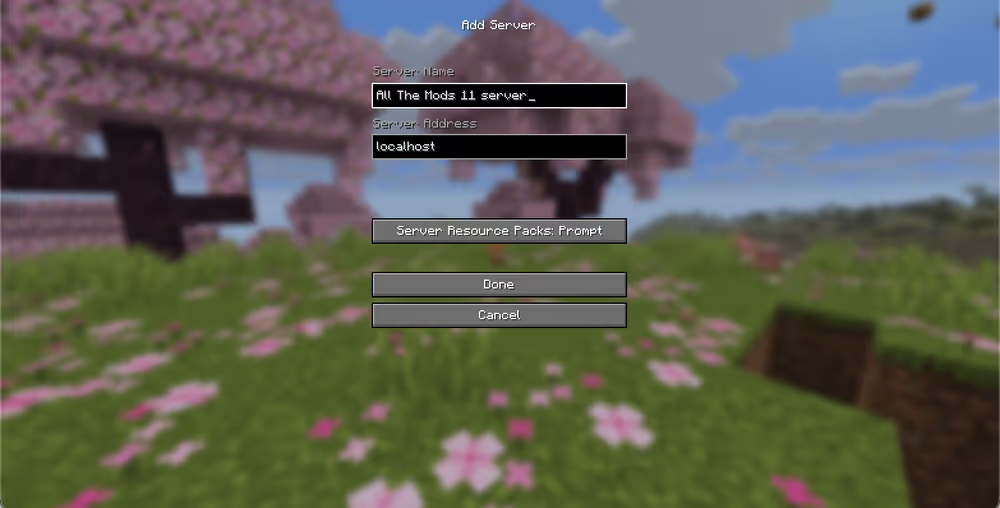
A successful connection confirms your All The Mods 11 server is running locally.
6. Open your server to the internet
At this point the server is only reachable by devices on your local network. To let friends join from outside, you need to open the port Minecraft runs on.
How to forward port 25565
The exact steps vary by router, but the general process is explained in this video:
portforward.com has step-by-step guides for almost every router model.
Can't forward the port? Some internet service providers block port forwarding on residential connections entirely. If portforward.com's guide isn't working, call your provider and ask them to open port 25565 on your account.
Find your IP
Search "what's my IP" in Google to get your public IP address. Share the full server address in this format:
123.45.67.89:25565
Final thoughts
The things that trip people up most with an ATM11 server are RAM allocation, Java version, and keeping client and server versions in sync after updates. Get those three right and the setup is straightforward. If the self-hosting side feels like too much to manage long-term, then All The Mods 11 server hosting option is worth looking at.