

Operator (OP) status gives a player full administrative access to a Minecraft server, including the ability to run commands, change game settings, and manage other players. You can grant OP status through the Game Panel in a couple of ways - via the console directly or using the Player Manager tab. This guide covers both methods so you can use whichever suits your workflow.
⚠️
WARNING: OP players have unrestricted access to all server commands. Only grant OP status to players you fully trust.
Method 1: Using the Console
- Head over to the Game Panel and make sure your server is running.
- Navigate to Console.
- Type
/op YourUsernameinto the console and press Enter.
👉
NOTE: Replace
If you're on Bedrock or have enabled crossplay, you might have a "." or space in your username. In this case, simply run the following command (between the "" symbols):
-
-
YourUsername with your exact Minecraft username. The command is case-insensitive but using the correct capitalisation avoids confusion.If you're on Bedrock or have enabled crossplay, you might have a "." or space in your username. In this case, simply run the following command (between the "" symbols):
-
op "Your Username"-
op ".YourUsername"- Look for a confirmation message in the console output:
Made YourUsername a server operator.
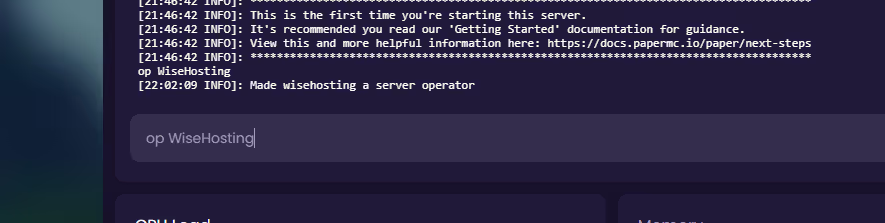
- To remove their OP permissions, type
/deop YourUsernameinto the console instead.
Method 2: Using the Player Manager
- Head over to the Game Panel and make sure your server is running and you are logged into the server in-game.
- Navigate to Console → Player Manager.
- Find your username in the player list.
- Click on your username and select OP from the available actions.
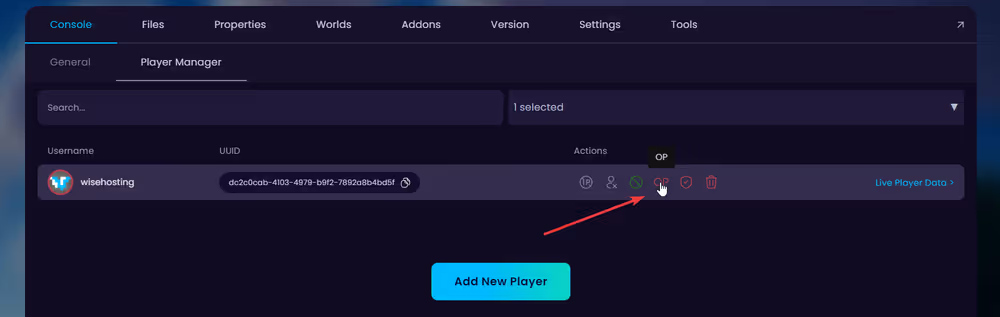
💡
TIP: You can remove their OP permissions by clicking on the button again.


