



The "Connection timed out: getsockopt" error means your Minecraft client could not establish a connection with the server within a set timeframe. It is almost always caused by a network or firewall issue on the client side, not the server itself. This guide walks you through the most common causes and how to fix each one.
What's Causing This Error?
The most common causes of this error are:
- Your network's firewall is blocking the connection - this is common on school, work, or public networks
- You are connecting to an incorrect IP or port
- Your computer's firewall is blocking Java or Minecraft
- The server is temporarily offline for maintenance or automatic restarts
Method 1: Check Your Server IP and Port
- Head over to the Game Panel and copy the IP from top-right corner.
- In Minecraft, go to Multiplayer → Add Server and paste the correct IP and port in the format
ip:port(e.g.,127.0.0.1:25565).
Method 2: Allow Java Through Windows Firewall
- Close Minecraft completely.
- Open Windows Security on your computer.
- Navigate to Firewall & Network Protection.
- Click Allow an app through firewall.
- Find
javaw.exein the list.
- Make sure both Private and Public checkboxes are ticked.
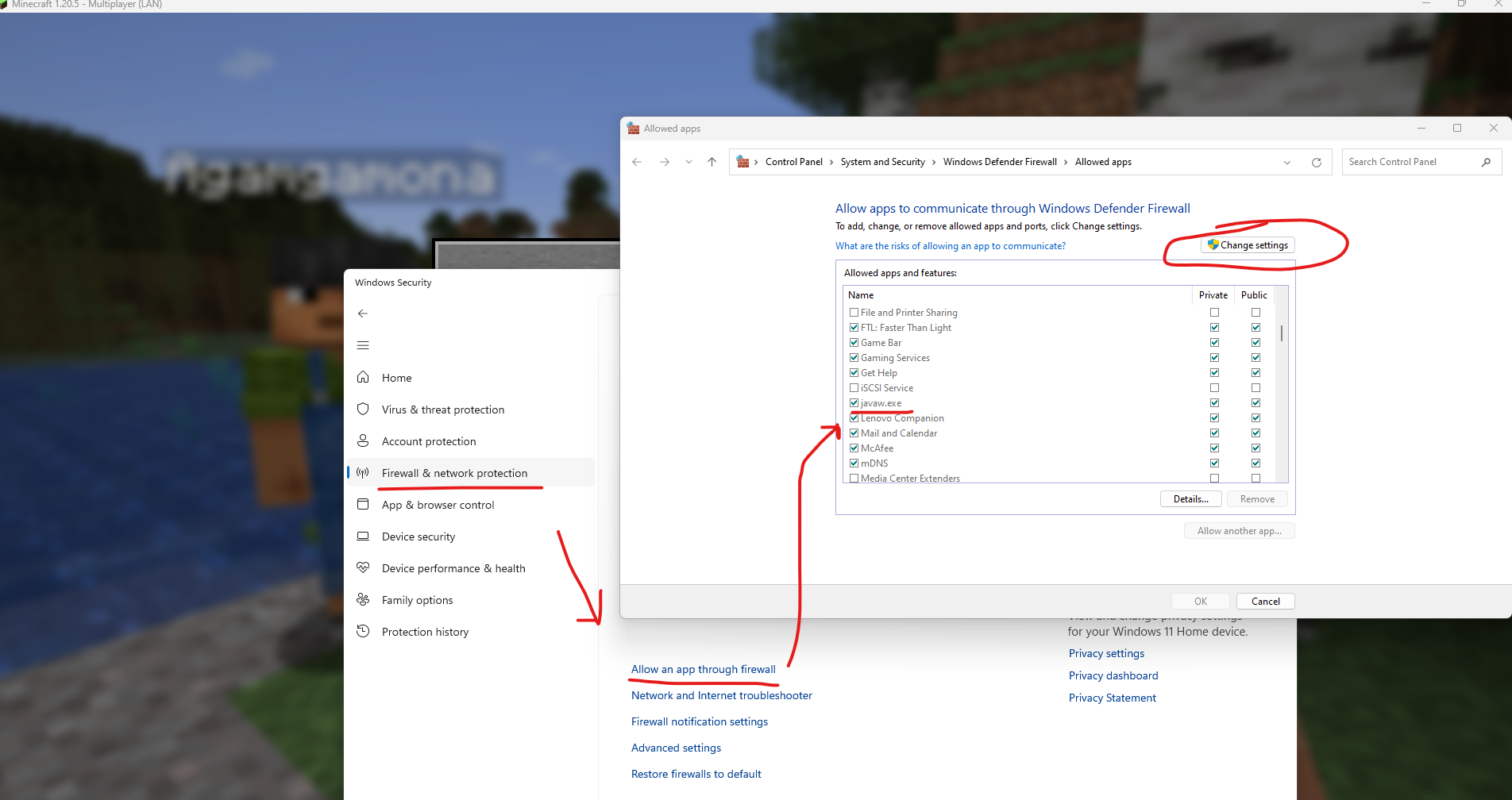
- Click OK and relaunch Minecraft.
Method 3: Flush Your DNS Cache
- Open the Start Menu and search for
cmd. - Right-click Command Prompt and select Run as administrator.
- Type the following command and press Enter:
ipconfig /flushdns- Wait for the confirmation message, then close the window.
- Relaunch Minecraft and try connecting again.
Method 4: Switch to a Different Network
If you are on a school, work, or public network, the network administrator may have blocked the port your server runs on. Try the following:
- Connect using mobile data or a personal hotspot
- Switch to a different Wi-Fi network
- Use a VPN to bypass network-level restrictions
Method 5: Request a Node Transfer
If none of the above methods work and other players can connect fine, the issue may be related to the server node. Contact our support team and request a node transfer.
The problem is still there?
If you still experience the getsockopt error when trying to log in to your server then Mojang could be carrying out a maintenance. To confirm this, please visit these websites to see whether other people are having the same problem:


