
So you want to make a RLCraft server to play with friends, but don't know where to start? RLCraft is one of the most downloaded modpacks of all time and setting up a server for it is more involved than newer packs. Unlike most modpacks, the RLCraft server pack does not include Forge or a startup script. You need to install both manually.
Before you get started
Hosting a modded server on your own PC is free but comes with three trade-offs worth knowing up front.
- It's only online while your PC is on
- The RLCraft server needs 6-8GB of RAM and a good CPU, and that's before you've joined yourself
- Letting friends join requires opening a router port, which can expose your network if you're not careful
None of this is a dealbreaker, but it's worth knowing now rather than mid-setup.
RLCraft Server Hosting
If that sounds like more than you want to manage, using a Minecraft hosting provider skips all three. If you haven't already, purchase a server with WiseHosting to get started, then follow the instructions:
- Head to your WiseHosting game panel and locate the Version tab
- Choose Modpacks and select CurseForge from the dropdown filter
- Search for RLCraft and click Install
- Click Start to start your server
- Copy the IP and join the world
Your server is live in under two minutes, stays online 24/7, and never touches your home network.
1. Download the RLCraft server pack
If you don't have the CurseForge app installed, grab it first. You'll need it to install RLCraft on the client side later in this guide.
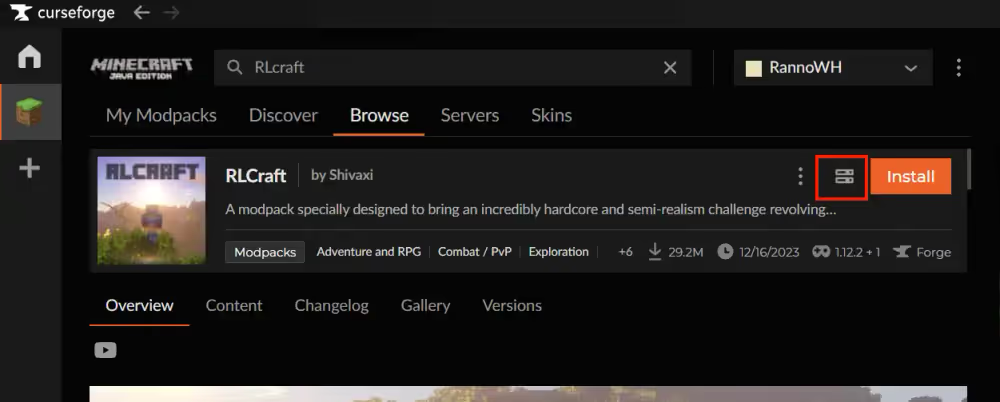
Head to the RLCraft page on the CurseForge app and click on the Download server pack button, this will download the newest version zip. Save it to an easily accessible location like your desktop.
Extract the server pack
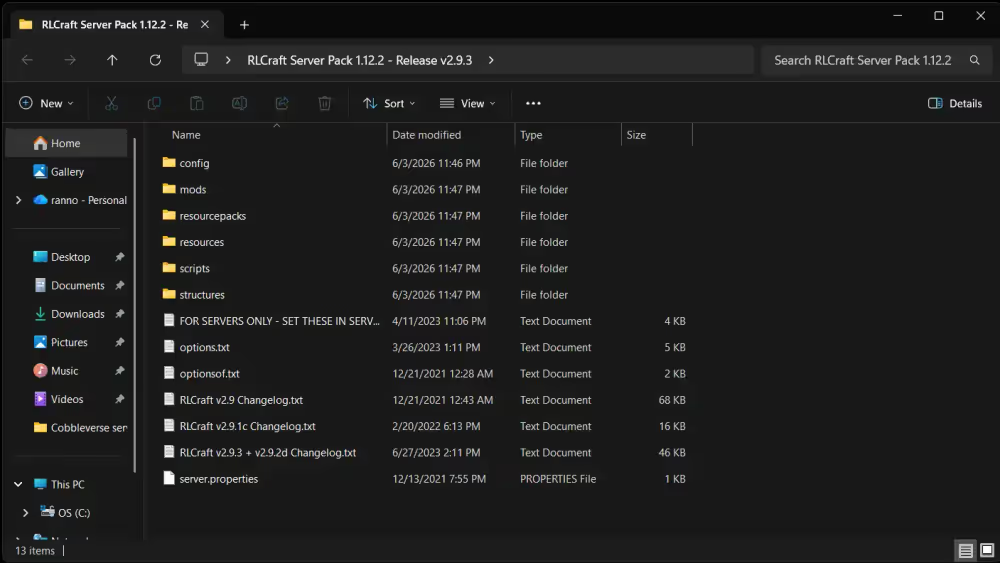
Right-click the downloaded .zip and extract it on your desktop this will be your server folder. Inside you'll find a mods folder, a config folder, and several other files. You won't see a Forge jar or a startup script. That is normal. Both need to be added manually.
2. Install Forge
RLCraft runs on Forge 1.12.2 - 14.23.5.2864.
Java version compatibility
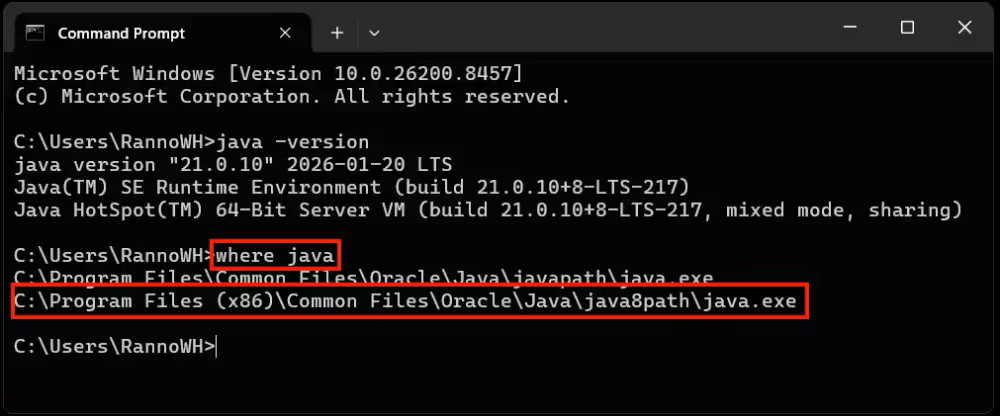
RLCraft runs on Forge 1.12.2, which requires Java 8. This catches a lot of people off guard because newer modpacks use Java 17 or 21. If Java 8 isn't your default, the server won't launch.
To check what's installed:
- Open Command Prompt (press Win + R, type cmd, press Enter)
- Type java -version and press Enter
- The output should say java version "1.8.x" or similar
It likely shows a different version, download Java 8 and run the installer. With multiple Java versions installed, you'll need to reference the full Java 8 path in the startup script below, or simply uninstall any version that is not Java 8.
Download the Forge installer
Go to the Forge download page for 1.12.2 and find version 14.23.5.2864 under the Latest section. Click Installer to download it.
Pressing Skip will start the .jar download

Run the Forge installer
Move the downloaded forge-1.12.2-14.23.5.2864-installer.jar into your server folder.
- To run it double-click the .jar file
- Choose Install server
- Select your server folder path
- click OK
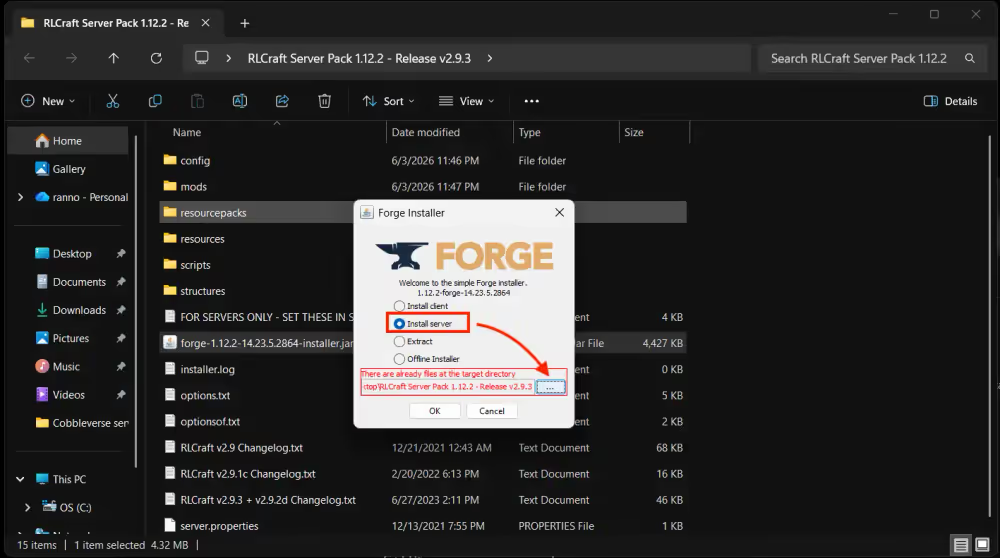
This installs Forge directly into your server folder and generates the forge-1.12.2-14.23.5.2864.jar file you'll need to start the server.
3. Create a startup script
The RLCraft server pack doesn't include a start.bat file, so you need to create one. In your server folder, create a new text file and rename it start.bat. Open it with notepad and paste your startup script.
Change the Java path to match where Java 8 is installed on your PC, and make sure you have /java.exe at the end of the path to point to the Java 8 executable.
It should look like this when pointing to the specific Java 8 install path:
"C:\Program Files (x86)\Common Files\Oracle\Java\java8path_target_1148978484/java.exe" -Xms2G -Xmx4G -jar forge-1.12.2-14.23.5.2864.jar nogui
pause
And like this when you remove all java versions thats not Java 8:
java -Xms4G -Xmx6G -jar forge-1.12.2-14.23.5.2864.jar nogui
pause
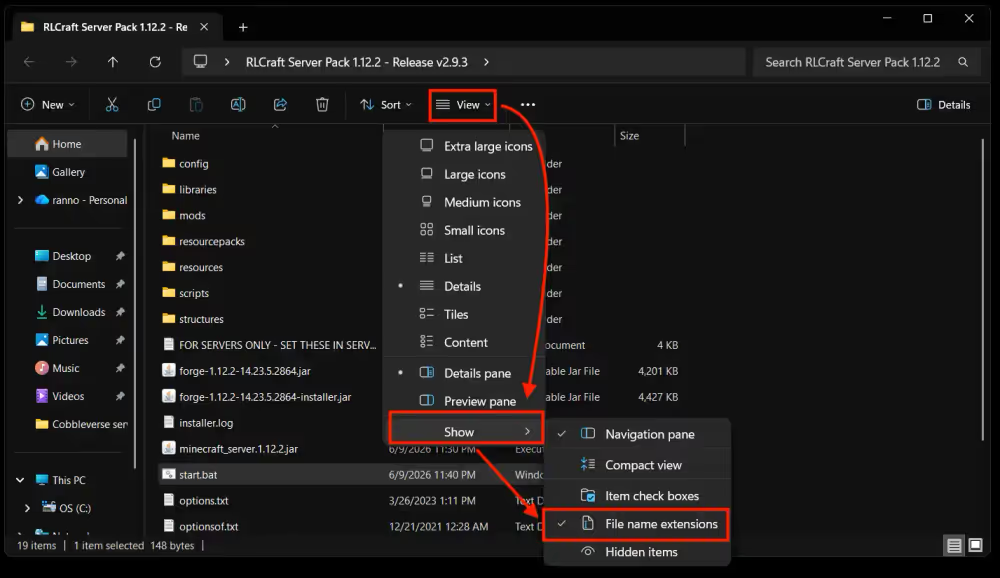
To create a .bat file you need to have show file name extensions enabled.
4. Accept the EULA and configure server.properties
Accept the EULA
Double-click start.bat to run the server for the first time. It will generate some files and then stop, telling you to accept Minecraft's End User License Agreement.
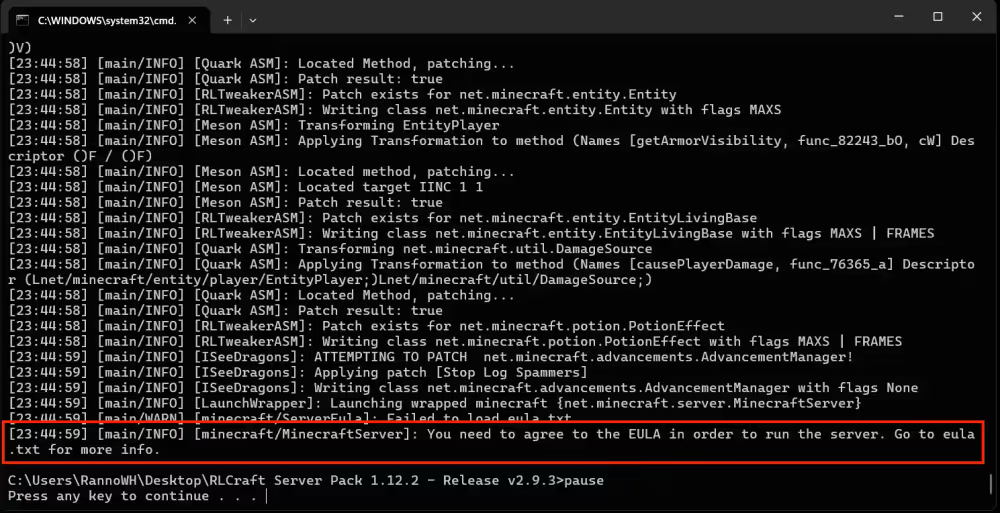
Open the eula.txt file in your server folder and change:eula=falseto:eula=true
Save the file.
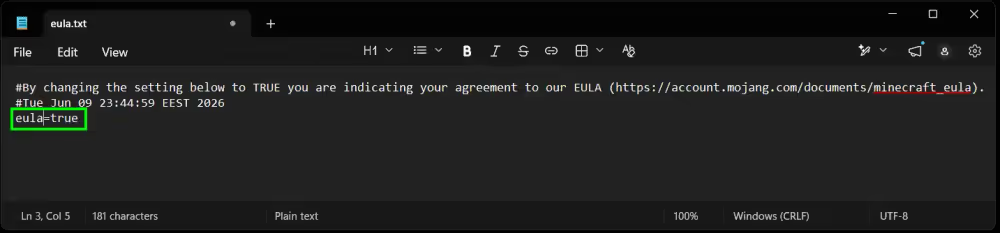
Configure server.properties
Before running the server again, open server.properties in a text editor and make sure these four settings are correct:
enable-command-block=true
allow-flight=true
difficulty=3
max-tick-time=-1
5. Install RLCraft on your client
Use the CurseForge app
Each player joining the server needs RLCraft installed on their own machine:
- Open the CurseForge app
- Select Minecraft from the game list
- Search for RLCraft under Browse Modpacks
- Click Install
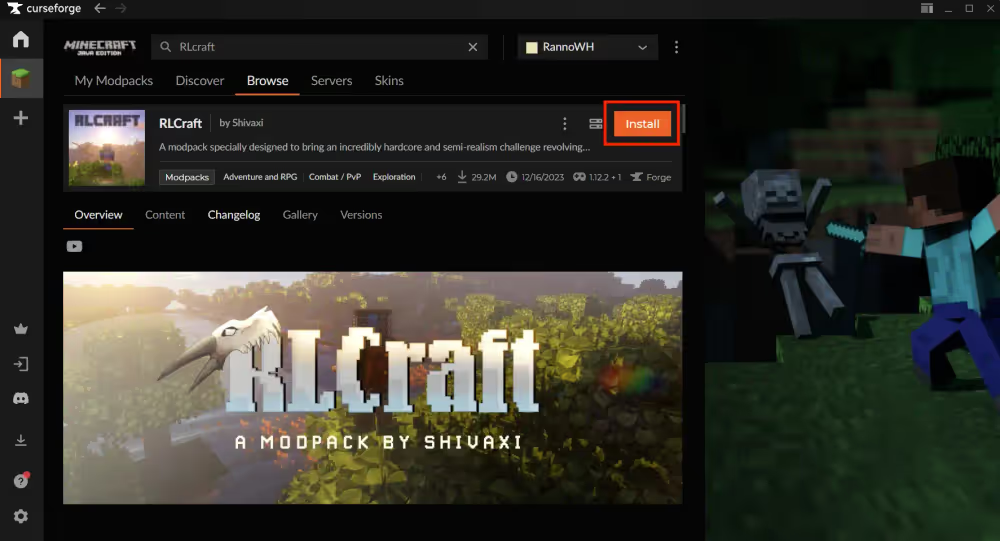
Once installed, launch RLCraft from the CurseForge app and it loads the correct Forge version and all mods automatically.
Match client and server versions
Every player's RLCraft client version needs to match the server exactly. A mismatch produces a connection error like this:
Connecting to server failed.
Mods that are missing or have version differences:
[list of mismatched mods]
To check the client version, look at the version badge in the top right corner of the RLCraft card on the My Modpacks page in CurseForge. To switch versions, click the three-dot menu on the modpack, select Change Version, and pick the version that matches the server.
6. How much RAM does an RLCraft server need?
RLCraft runs on Minecraft 1.12.2 with around 120 mods, which is lighter than modern packs like ATM11 or Craftoria. That said, it still needs at least 6GB allocation to run without lag, especially when multiple players are exploring simultaneously and triggering mob spawns.
RLCraft server RAM allocation:
| Players | Recommended RAM |
|---|---|
| 1-3 | 6GB |
| 4-6 | 8GB |
| 7+ | 10GB |
If you plan to play on the same machine you're hosting from, factor in the client's RAM on top of the server's. RLCraft's client runs well on 6–8GB. On a 16GB PC this is usually manageable. If the performance still feels tight, RLCraft server hosting through a dedicated provider means your machine only needs to run the client.
Allocate the right amount of RAM
Update the -Xmx value in your start.bat to match your target. For 6GB:
-Xmx6G -Xms3G
-Xmx sets the maximum RAM the server can use. -Xms is the starting allocation. Setting -Xms to around half of -Xmx lets the JVM grow memory as needed rather than claiming everything at launch.
7. Start the server and connect locally
Launch the server
Double-click start.bat to start the server. The terminal loads through all the mods one by one. A successful startup should end with:
[Server thread/INFO] [antiqueatlas]: Saving local markers data to NBT
Startup time: The first boot takes 3–5 minutes while RLCraft generates initial data. Later starts are faster.
To stop the server: Type stop in the terminal and press Enter. This saves the world and shuts down cleanly. Closing the terminal window directly risks world corruption on the next launch.
Connect via localhost
Open Minecraft through the CurseForge app, go to Multiplayer, and click Add Server. Set the Server Address to localhost and click Done.
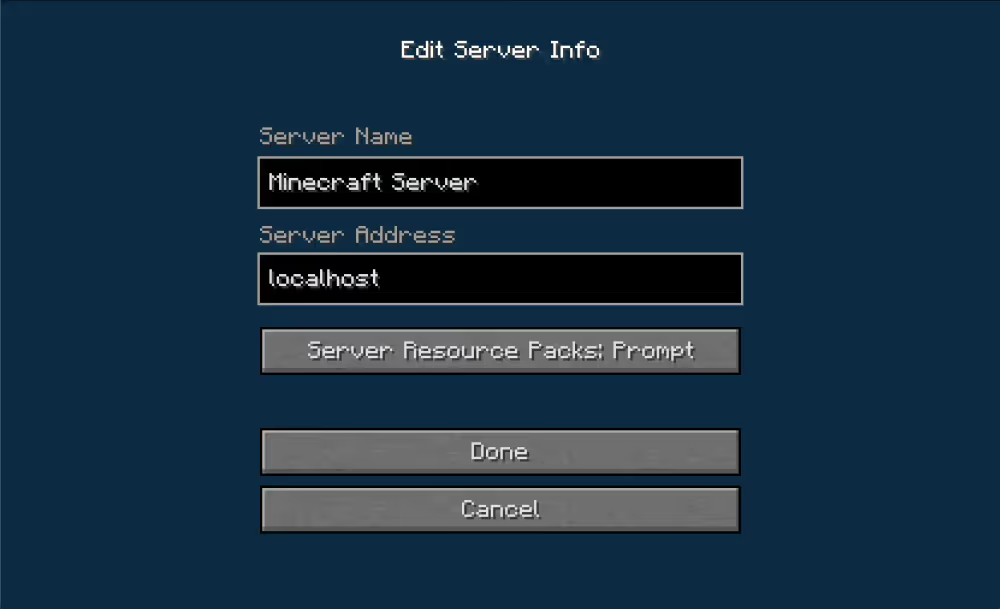
If everything is set up correctly, you'll connect and load into an RLCraft world. If it immediately tries to kill you, it's working.
8. Set up port-forwarding
Your server is currently local network only. To let friends join from outside, you need to open the port Minecraft runs on.
What is port forwarding?
Your router blocks unsolicited incoming connections by default. Port forwarding creates a rule that routes traffic on a specific port directly to your PC. Minecraft Java Edition uses port 25565 by default, which can be changed in server.properties under server-port if needed.
How to forward port 25565
The steps vary by router but follow the same general steps explained in this video:
portforward.com has router-specific walkthroughs for almost every model. Search yours there if the steps don't match what you're seeing.
Find your IP
Search "what's my IP" in Google to get your public IP address. Share it with friends in this format:
123.45.67.89:25565
Final thoughts
RLCraft's server setup has more steps than most modpacks, but each one is straightforward once you know what to expect. Java 8, the Forge installer, a custom start.bat, and four server.properties settings. Get those right and you're in. Good luck. You will need it.
Also check out our video on how to make a RLCraft server