
Minecraft TPS Explained: What It Is & Why It Matters
Minecraft servers run on a game loop that processes everything happening in your world: player movements, redstone contraptions, mob AI, crop growth, and terrain generation. This loop runs in fixed intervals called ticks.
TPS (Ticks Per Second) measures how many game ticks your Minecraft server completes each second, with 20 TPS being the ideal target. When TPS drops below 20, your server becomes laggy.
Why TPS is Important for Minecraft Servers
TPS directly determines whether your server feels responsive or not. Unlike client-side FPS (frames per second), which only affects individual players' visual smoothness, TPS affects everyone on the server simultaneously.
TPS vs. FPS
Many beginner server owners confuse TPS with FPS, but they measure completely different things:
- TPS (Ticks Per Second): Server-side performance affecting gameplay mechanics for all players
- FPS (Frames Per Second): Client-side performance affecting visual smoothness for individual players
You can have 60 FPS on your screen while playing on a server with 12 TPS, your game will look smooth, but everything will respond slowly.
What is a Good TPS?
20 TPS is the target for any healthy Minecraft server. This is the maximum tick rate Minecraft servers can achieve, the game is designed around this number.
- 20 TPS: Perfect. Server is running optimally.
- 19-20 TPS: Minor fluctuations are normal
- 17-19 TPS: Slight performance impact.
- 15-17 TPS: Noticeable delay in actions.
- Below 15 TPS: Unplayable
Why Servers Can't Exceed 20 TPS
Minecraft's game engine is hard-coded to target 20 TPS. Even if your server hardware could theoretically process more ticks per second, the game won't allow it. A 4-tick redstone repeater always means 0.2 seconds, regardless of server performance.
How To Check Your Minecraft Server TPS
You have several methods to check your server's current TPS, from in-game commands to third-party monitoring tools.
In-Game Commands (Easiest)
Most server platforms include a built-in TPS command:
For Spigot, Paper, Purpur:
/tpsTypical output:
TPS from last 1m, 5m, 15m: 19.85, 19.92, 19.95For Vanilla servers: Vanilla Minecraft doesn't include a /tps command by default. You'll need to:
- Enable the debug screen (F3+2) and check "TPS" on the bottom right side
- Use the
/debug startcommand (creates a profiler report but requires operator permissions)
Spark Profiler
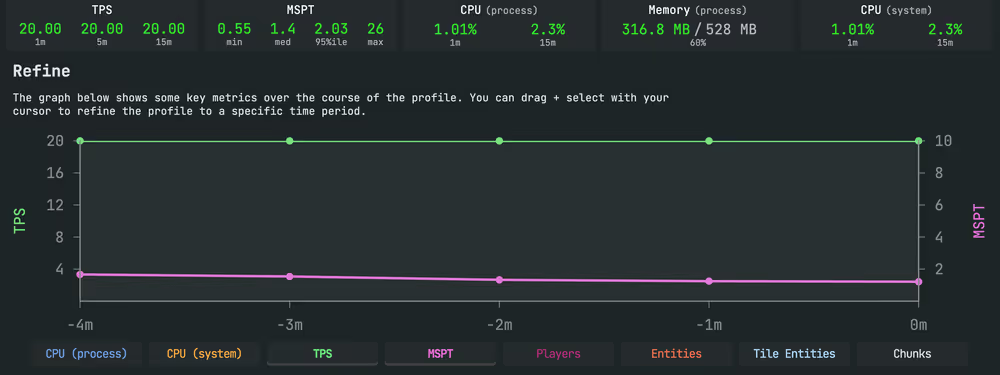
Several plugins provide real-time TPS monitoring with more detailed information, the most popular one being Spark.
- Use
/spark profiler startto start profiling. - Use
/spark profiler stopto stop profiling - Open the link given to you to view results.
- You'll get a detailed report of your server performance:
MINECRAFT ONLY SERVER HOSTING
Start your Minecraft Server today and get 20% OFF with code SAVE20
- ✓ Built for Minecraft
- ✓ Only takes 67 seconds
- ✓ 24/7 Minecraft Experts