



This article will assist you with resetting or reinstalling your entire server through the game panel.
💡
Reset Server - function will delete all files on your server and reset it to a fresh install.
Reinstall Version - function will overwrite the required server files (server.jar, etc.) and keep any other files.
Reinstall Version - function will overwrite the required server files (server.jar, etc.) and keep any other files.
How to Reset or Reinstall Your Server
- Log in to your Game Panel and select the server you wish to reset/reinstall.
- Head over to Settings → General and click on the Reinstall Server button.
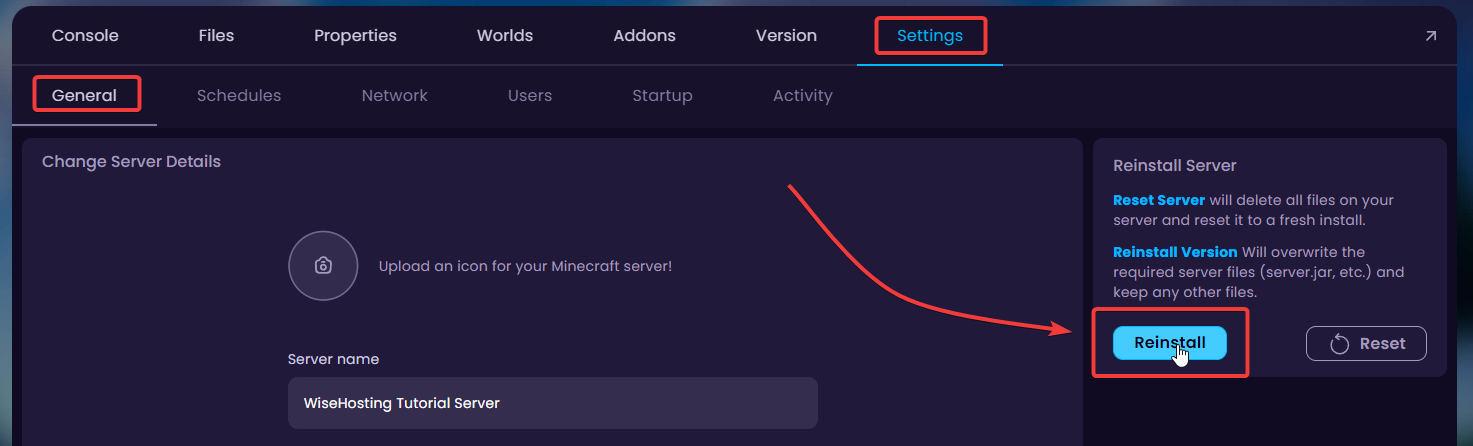
- From here you can select whether to reset or reinstall your server. Please make sure to create a backup of your server in case you lose any important data during this process.


