

Through Namecheap you’re able to buy and manage domains. With a domain, you’re able to set Dynmap to use a custom domain such as map.wisehosting.com, instead of http://135.125.1.2:25492.
👉
For this you need to purchase a domain through Namecheap.
How to Link a Custom Domain to Dynmap?
- Head over to the Namecheap’s Dashboard and click on the Manage button of your domain.

- Navigate to the Advanced DNS page and click on the Add New Record button.
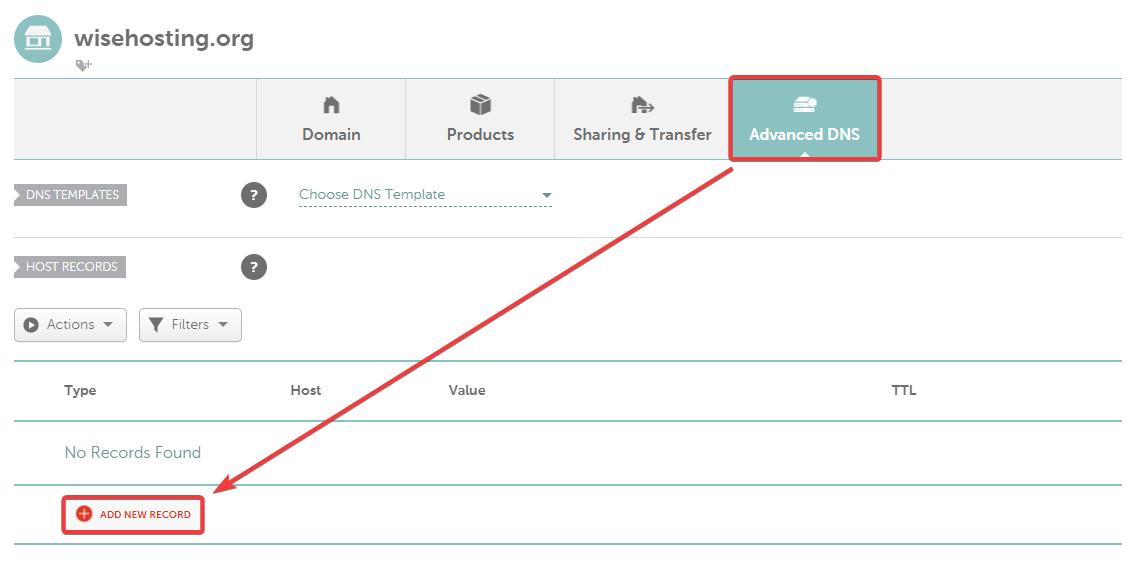
- Insert the following details:
Type:URL Redirect Record
Host:your_subdomain- This will be the subdomain that will be used. In this case, I would want it to be map.wisehosting.org, so I writemap.
Value:current_link- This will be the current link to your Dynmap’s map.
Make sure that you’ve chosen it to be “Masked”. This makes it show the domain in the browser’s bar instead of the server’s IP.

- Done! It may take up to 48 hours for the DNS records to be updated globally, but in most cases it’s pretty instant.
🧑💻
If you still require assistance, please get in touch with our support team by opening a ticket or by joining our community Discord server.


