

Please note that Credit Balance cannot be exchanged for “real-life money”. Once deposited, it cannot be withdrawn.
Credit Balance is the prepaid balance deposited into your WiseHosting’s billing account that can be used to automatically pay future invoice(s).
Where Does Credit Balance Come From?
Type | Additional Information |
Manual Deposit | When you add funds to your Credit Balance manually through the Billing Area. |
Overpayment | When you overpay an invoice, the remaining funds will be added to your Credit Balance. |
Downgrading Service | When you’re downgrading your service, the difference between the 2 plans will be refunded to you in account credit. |
Affiliate Withdrawal | When you’d like to withdraw your affiliate earnings into your Credit Balance. |
How To Add Credit Balance?
- Head over to the Billing Area.
- Navigate to the Orders → Credits tab.
- From there, you’re able to select the amount (between $10 - $200 USD) to add to your Credit Balance. After inserting the amount, click on the preferred payment method.
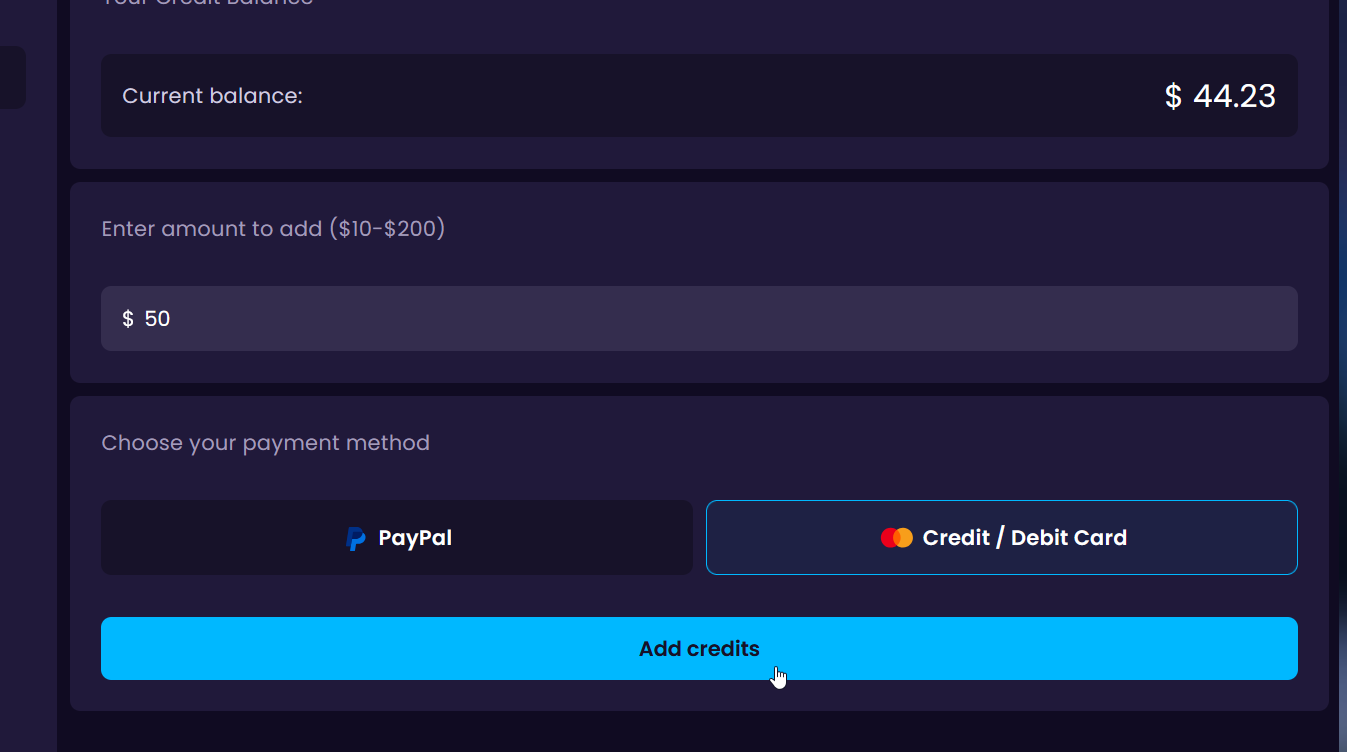
- Complete the payment and the balance will be topped up with the inserted amount.
How To Check Your Credit Balance?
You’re able to view your account’s Credit Balance by logging into your account and it’ll be shown at the top-right of the page":

How To Use Credits With An Active PayPal Subscription?
To pay your monthly, quarterly, or annual server invoice using credits, you must cancel your automatic PayPal subscription first. Otherwise the PayPal subscription will automatically run on the set day and amount as it does not check the invoice status.
When paying for server upgrades (e.g., disk space, backups, etc.) using credits, you do not have to cancel the PayPal subscription. The credits will be applied without affecting your PayPal billing.


