

In this guide we'll be using the mc-packs.net website to host our resource pack and implementing it to our server.
How To Add A Resource Pack To Your Minecraft Server?
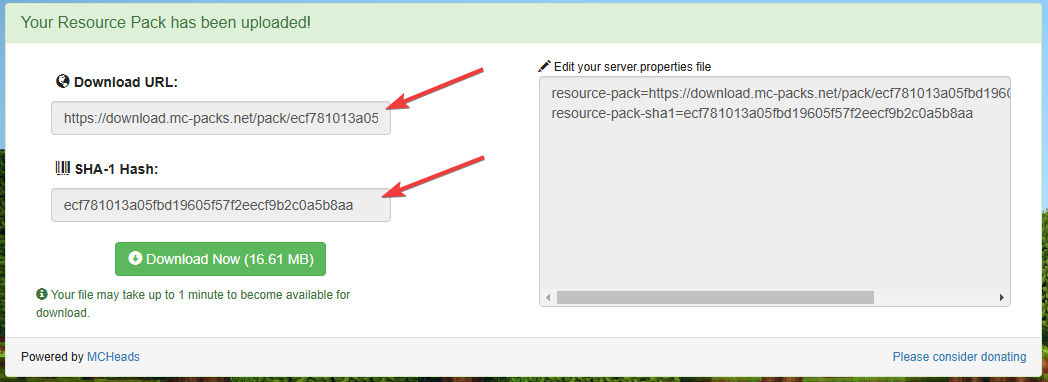
- Head over to the mc-packs.net website and upload your resource-pack.
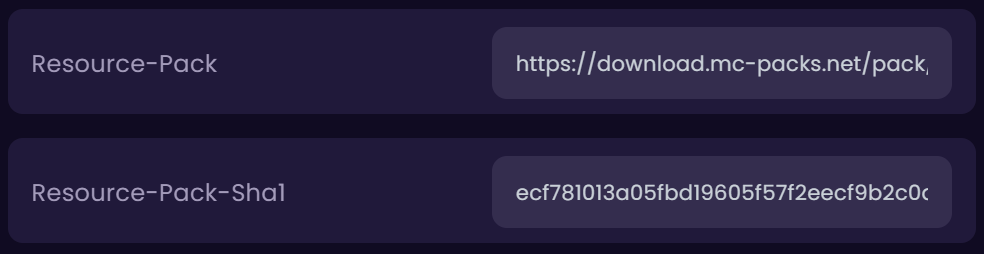
If you encounter an error after trying to upload the resource-pack, it may not be correctly built. Make sure that it has all the contents and is properly configured. - After uploading the resource-pack, it will provide you with the download URL and SHA-1 text. Close your server and change these variables under Properties → Admin tab in the game panel.
- OPTIONAL: If you would like to make it a requirement for players to use the resource-pack when playing on the server, you can toggle the
Require-Resource-Packoption.



