
What is a JVM Flag?
The Java Virtual Machine (JVM) is the software engine that runs Minecraft servers. Since Minecraft is written in Java, it requires the JVM to execute the game code and manage resources like memory, threads, and processing power.
JVM flags are configuration commands that tell Java how to run your Minecraft server more efficiently. They are like performance settings for the engine that powers your server.
What Problem Are JVM Flags Trying To Solve?
JVM flags are designed to help Java run Minecraft servers more effectively. Right now, Java's default settings run into two major challenges when hosting Minecraft:
- Minecraft servers can put unusual pressure on the JVM. Defaults are often fine on modern Java, but some servers benefit from garbage collection tuning. That means JVM flags provide specialized garbage collection settings that help Java efficiently manage Minecraft's workload.
- Java doesn't know what's important for gaming performance. When Java runs with default settings, it doesn't prioritize low-latency operations that Minecraft needs. If it spends time on long garbage collection pauses, it may cause lag spikes and poor player experience.
There's a big computational cost involved in inefficient garbage collection. With JVM flag optimization, servers are less likely to waste resources on preventable lag spikes and memory management issues.
How Are JVM Flags Structured?
JVM flags should be structured and formatted as command-line arguments placed between the java command and your server JAR file.
JVM flags are specialized parameters that use specific prefixes and syntax to control Java's behavior. It's the same format developers use when launching any Java application, and it's directly interpreted by the Java Virtual Machine.
Some common JVM flag elements you'll use in your startup script include:
-Xmsand-Xmxfor memory allocation settings with size suffixes likeGfor gigabytes-XX:+for enabling boolean options (the plus sign turns features ON)-XX:-for disabling boolean options (the minus sign turns features OFF)-XX:FlagName=valuefor setting numeric parameters or string valuesMorGsuffixes to specify megabytes or gigabytes in memory values- Multiple flags separated by spaces to create a complete configuration
If your server has specific requirements, you might want to add more flags, using garbage collection tuning parameters, enabling performance logging, or incorporating diagnostic options for troubleshooting.
Here's a simple example following the Aikar's Flags specification:
java -Xms10G -Xmx10G -XX:+UseG1GC -XX:+ParallelRefProcEnabled -XX:MaxGCPauseMillis=200 -XX:+UnlockExperimentalVMOptions -XX:+DisableExplicitGC -XX:+AlwaysPreTouch -XX:G1NewSizePercent=30 -XX:G1MaxNewSizePercent=40 -XX:G1HeapRegionSize=8M -XX:G1ReservePercent=20 -XX:G1HeapWastePercent=5 -XX:G1MixedGCCountTarget=4 -XX:InitiatingHeapOccupancyPercent=15 -XX:G1MixedGCLiveThresholdPercent=90 -XX:G1RSetUpdatingPauseTimePercent=5 -XX:SurvivorRatio=32 -XX:+PerfDisableSharedMem -XX:MaxTenuringThreshold=1 -jar paper.jar --nogui
Breaking down the structure:
- Memory allocation:
-Xms10G -Xmx10Gsets both initial and maximum heap to 10GB - Garbage collector:
-XX:+UseG1GCenables the G1 collector
-XX:+UseG1GC often doesn’t change anything by itself, most of the impact comes from heap sizing and the other tuning flags.- Performance tuning:
-XX:MaxGCPauseMillis=200targets 200ms maximum pause time - G1-specific flags: Multiple
-XX:G1*parameters fine-tune garbage collection behavior - Server JAR:
-jar paper.jarspecifies which server software to run - Server options:
--noguidisables the graphical interface
Should You Use JVM Flags on Your Minecraft Server?
You must set memory (-Xms / -Xmx). Beyond that, extra JVM tuning flags are optional. If you’re on a modern JVM (Java 17/21+), try running with no additional flags first, and only add Aikar’s flags if you actually see garbage-collection related stutters or log evidence.
Paper's developers maintain official documentation stating:
If you have GC problems or are running an older version of Minecraft/an older version of Java, try Aikar’s flags, which are optimized specifically for Minecraft.
Why JVM Flags Aren't Widely Known
The problem is that JVM flags sit in a knowledge gap:
- Too technical for most server owners: Understanding requires knowledge of Java memory management, garbage collection, and JVM internals
- Too game-specific for Java documentation: Oracle's documentation targets enterprise developers, not Minecraft hosts
- Not visible in server dashboards: Unlike RAM usage or TPS, JVM configuration doesn't show up in monitoring tools
- Works "well enough" to miss: Servers run with defaults. Many owners assume lag is normal or blame other factors
So most server owners either never learn JVM flags exist, see them mentioned but assume they're advanced optional tuning or try to implement them but get overwhelmed by technical documentation.
How To Enable/Disable JVM Flags? (Step by Step)
- Navigate to your server directory and find the file that launches your server
- Open the file in a text editor
- Replace the existing Java command
- Find the line that starts with
java -jaror similar.
- Find the line that starts with
- Replace it with your Java command
- Adjust memory values
- Change
-Xms10Gand-Xmx10Gto match your available RAM:- 8GB system: Use
-Xms6G -Xmx6G(leaving 2GB for overhead) - 16GB system: Use
-Xms14G -Xmx14G(leaving 2GB for overhead) - 4GB system: Use
-Xms3G -Xmx3G(leaving 1GB for overhead)
- 8GB system: Use
- Change
- Save and Test
How to do it on WiseHosting:
- Head over to the Game Panel and stop your server.
- Navigate to the "Settings -> Startup -> Command" tab.
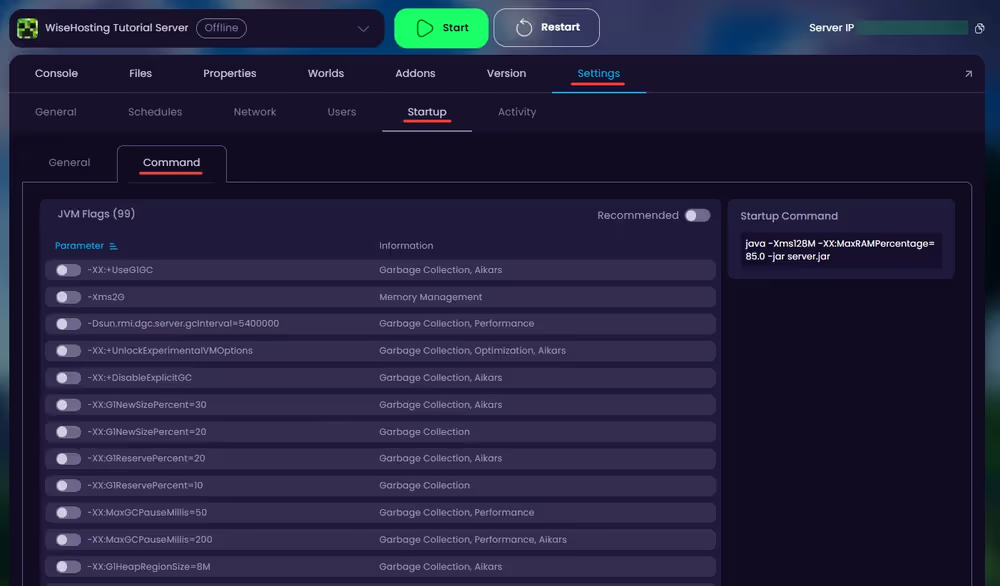
- Here you can find all the configurable Minecraft JVM flags. There is also a "Recommended" button which automatically applies all the recommended startup parameters to your server.