



Please make sure to have the correct server version installed before installing the mod/plugin. As GeyserMC is available for Paper, Spigot, Fabric and other versions! This guide will cover automatic installations through our preset.
⚠️
WARNING: If Minecraft recently got a new version, it may take up to a few weeks for Geyser to be updated as well.
Note that Geyser is not affiliated with WiseHosting in any way. We cannot speed up the process of Geyser updating their plugin/mod to support the latest version. To check the progress, visit their website.
Note that Geyser is not affiliated with WiseHosting in any way. We cannot speed up the process of Geyser updating their plugin/mod to support the latest version. To check the progress, visit their website.
How To Install GeyserMC (Paper/Spigot/Fabric)?
- Head over to the Game Panel and stop your server.
- Navigate to the Addons → Presets tab.
- Find the Crossplay option, click on Install and wait for the successful installation confirmation. After that, start your server.
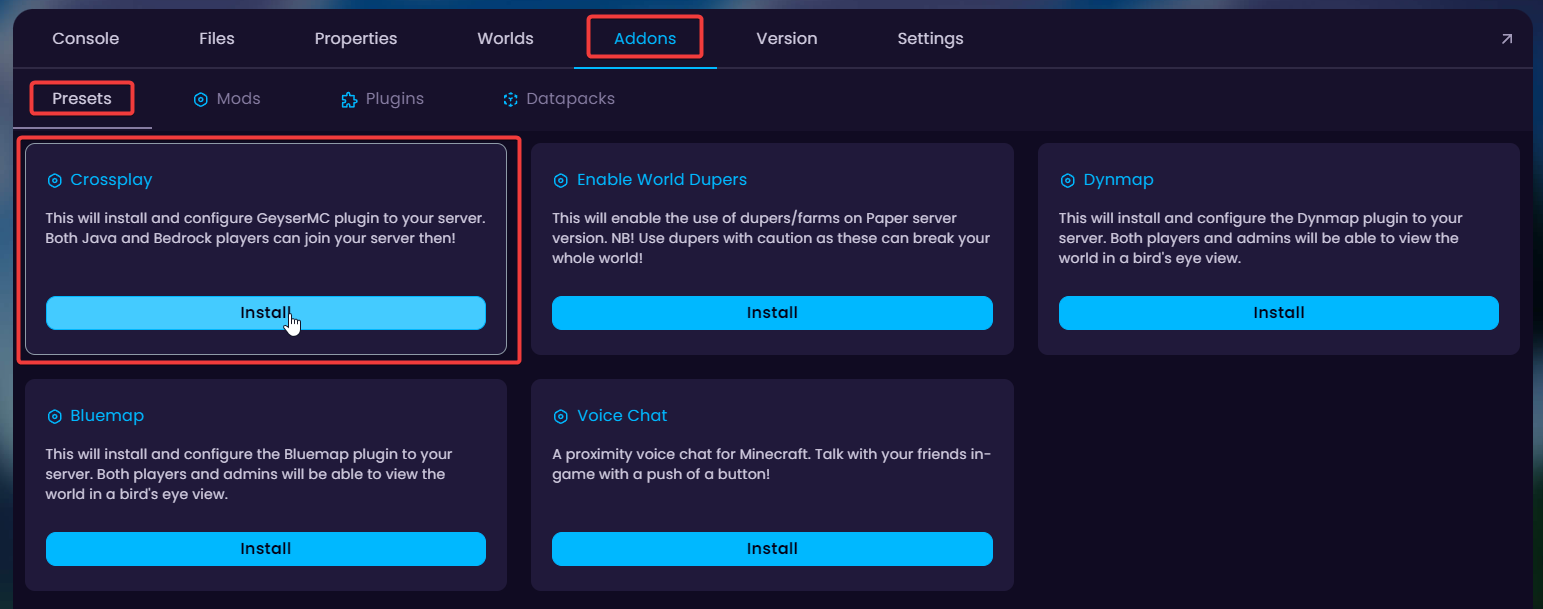
- Done! Bedrock players can now join using the port that is shown to you once the Crossplay preset is installed.
IMPORTANT: You will have two separate IPs for Bedrock players and Java players - after installing the preset, it will show you a new IP and port that Bedrock players can use to connect to the server.
⚠️
It is highly recommended to use your subdomain and port in order to connect to the server!


