



A ticking entity error occurs when a corrupted or broken mob or block entity in your world causes the server to crash on startup. Each time the server tries to update (or "tick") that entity, it crashes. This is most common on modded servers where a mod alters how an entity behaves in a way that conflicts with the game's update loop.
This guide walks you through how to locate the broken entity using your crash report and remove it using several methods.
Step 1: Read the Crash Report
- Head over to the Game Panel and stop your server.
- Navigate to Files and open the
crash-reportsfolder. - Open the most recent crash report file (named by date and time), which is usually at the bottom of the folder.
- Search for the section labelled
-- Entity being ticked --.

- Note down the entity type, its exact coordinates (X, Y, Z), and the dimension it is in - you will need these for the methods below.
-- Block entity being ticked -- instead, the culprit is a block entity (such as a chest or furnace) rather than a mob.Method 1: Kill the Entity via Console
Use this method if your server can start and run without immediately crashing.
- Head over to the Game Panel and start your server.
- Navigate to Console.
- Enter the following command, replacing the values with the entity type and coordinates from the crash report:
/kill @e[type=<entity_type>,x=<X>,y=<Y>,z=<Z>]level.dat file from your world folder and changing the SpawnX, SpawnY, and SpawnZ coordinates far away from the broken entity. This buys you time to enter the kill command before the server ticks the entity.Method 2: Reset the Chunk with MCASelector
Use this method if the server crashes on startup before you can run any commands. This only resets the specific chunk containing the broken entity, so the rest of your world stays intact.
- Head over to the Game Panel and stop your server.
- Navigate to Files and download your world folder to your computer.
- Open MCASelector on your computer and load the downloaded world folder.
- Use the coordinates from the crash report to locate the chunk on the map.
- Right-click the chunk and select Delete selected chunks.
- Save and re-upload the edited world folder to Files, overwriting the existing files.
- Start your server and check the console to confirm it loads without crashing.
Method 3: Forge Config Removal (Last Resort)
Use this method on Forge servers only if the methods above have not worked. This tells Forge to automatically delete any entity that causes a crash on the next startup. It is effective, but it may also remove other entities nearby - always revert the settings once your server recovers.
removeErroringEntities set to true permanently will cause Forge to silently delete any entity that errors in the future, including ones you may want to keep. Revert the setting as soon as the server is stable again.Forge 1.13 and Newer
- Head over to the Game Panel and stop your server.
- Navigate to Files, open your world folder, then open
serverconfig/forge-server.toml. - Set
removeErroringEntitiestotrue. - Set
removeErroringBlockEntitiestotrue.
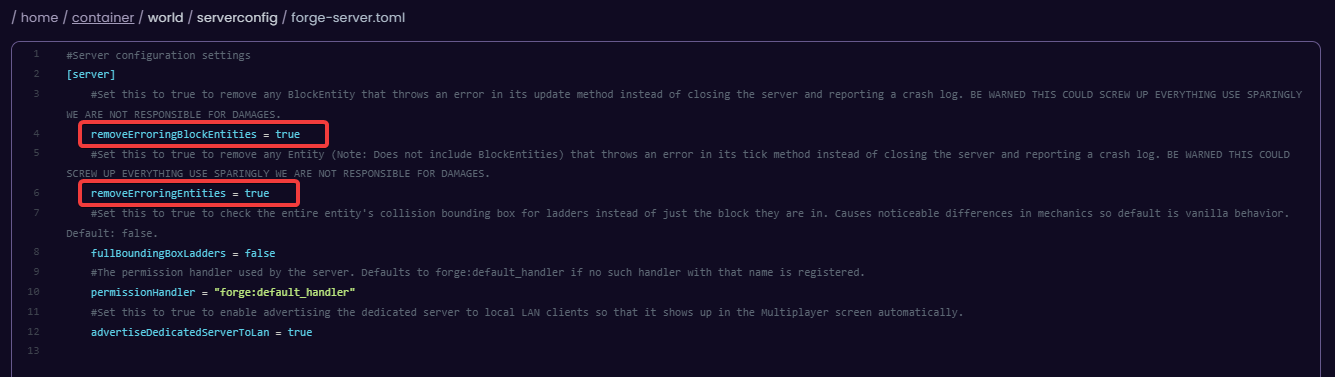
- Save the file and start your server.
- Once the server has loaded successfully, stop it and set both values back to
false. - Save and restart the server to confirm it runs correctly.
Forge 1.12.2 and Older
- Head over to the Game Panel and stop your server.
- Navigate to Files and open the
config/forge.cfgfile. - Set
removeErroringEntitiestotrue. - Set
removeErroringTileEntitiestotrue. - Save the file and start your server.
- Once the server has loaded successfully, stop it and set both values back to
false. - Save and restart the server to confirm it runs correctly.
Method 4: Restore a Backup
If none of the above methods resolve the crash, restoring a backup from before the error started is the safest option.
- Head over to the Game Panel and stop your server.
- Navigate to Files → Backups.
- Find a backup created before the ticking entity error began occurring.
- Click Restore and confirm the action.
- Start your server and confirm it loads without crashing.


